Your Mac plays to one speaker at a time. Audioplex plays to all of them: the TV, your Bluetooth speakers, the built-in ones. And it gets them in sync by itself.
One-time purchase · macOS 14.4 or later
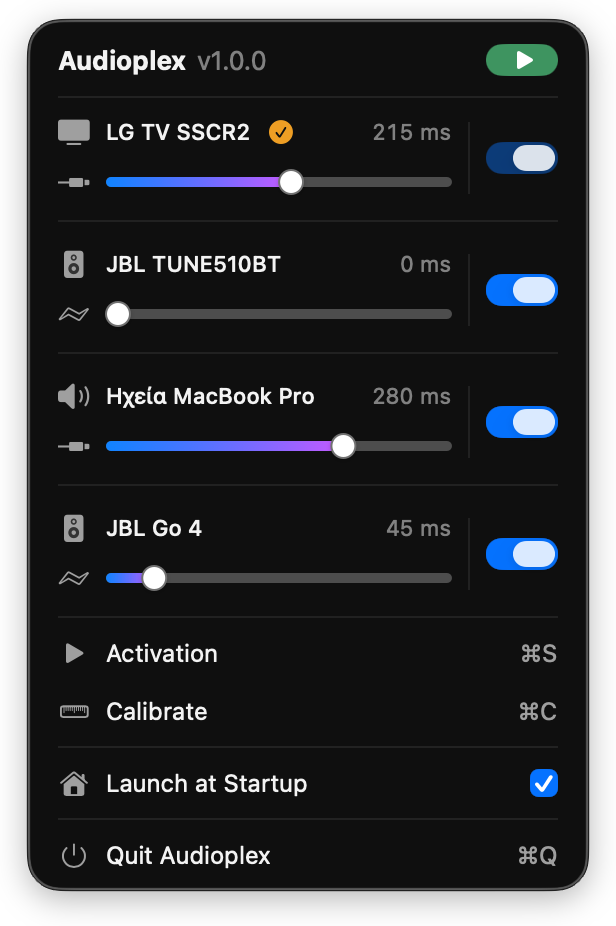
How it works
Everything your Mac can see is listed. Tick the ones you want.
Audioplex measures each speaker and fixes the delays itself.
The whole room, in time.
What it does
Press Calibrate and it sets every delay for you, no sliders to figure out.
Music, Netflix, YouTube, games. Nothing to set up per app.
One slider per speaker, in milliseconds. Change them any time.
No account, no analytics, no drivers, no password.
Requirements
FAQ
No. Press Calibrate once and Audioplex does it. The sliders are there if you want to fine-tune.
Yes. AirPlay, Bluetooth and built-in speakers all show up in the list.
Anything that plays through your Mac. Audioplex takes the sound your Mac is already making, so there's nothing to set up app by app.
System audio, so Audioplex can pass your sound along. Microphone, only while calibrating. Both stay on your Mac.
One-time purchase. No subscription. Family Sharing works.
Nothing is left behind: no drivers, no background apps. Just drag it to the Trash.

One small app in your menu bar.
